
前言:此节内容本人首次写代码时踩坑非常之多,有很多问题我会详细列出解决方案哟(●'◡'●)


摘要
本文围绕 HttpClient 和微信小程序登录功能展开,介绍了 HttpClient 的基本信息、核心 API 及 GET、POST 请求的入门案例,还详细阐述了微信小程序开发的准备工作、微信登录流程、需求分析与设计,以及完整的代码开发过程,包括配置定义、各层代码实现和拦截器编写等,最终实现了微信小程序的登录功能。
思维导图
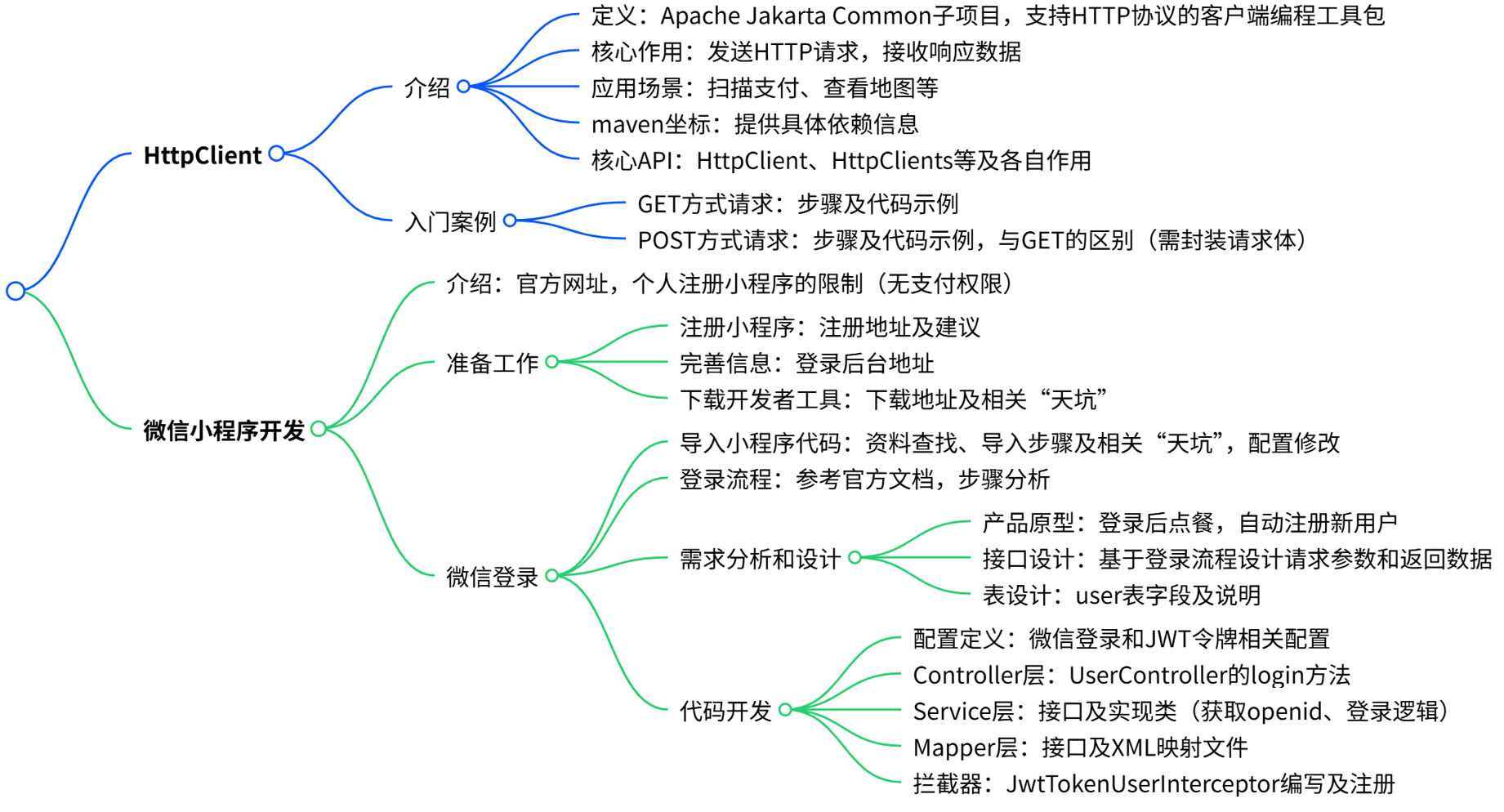
接下来就是本节的具体实现内容
1. HttpClient
1.1 介绍
HttpClient 是Apache Jakarta Common 下的子项目,可以用来提供高效的、最新的、功能丰富的支持 HTTP 协议的客户端编程工具包,并且它支持 HTTP 协议最新的版本和建议。

HttpClient作用:(核心)
发送HTTP请求
接收响应数据
HttpClient应用场景:
当我们在使用扫描支付、查看地图、获取验证码、查看天气等功能时
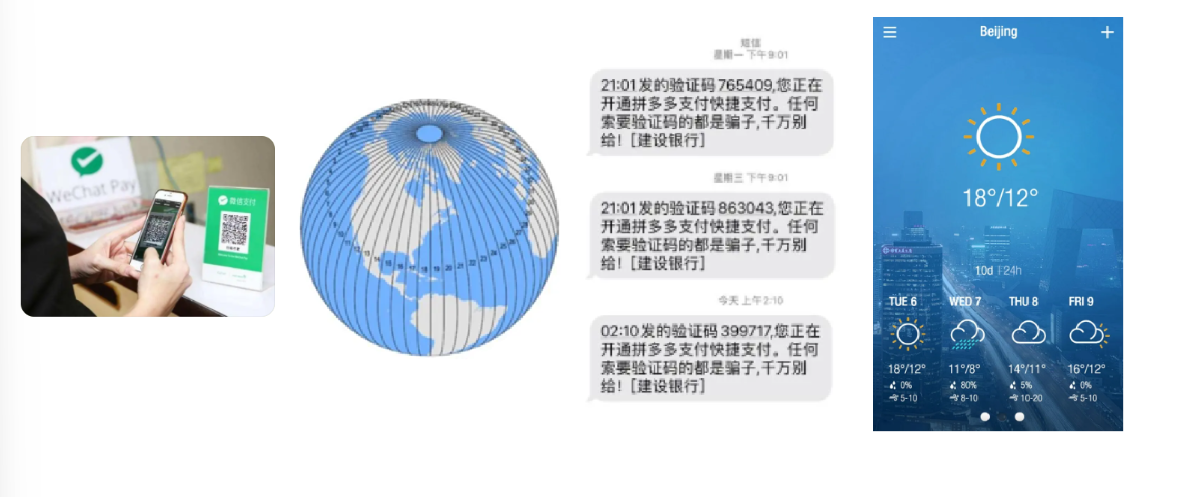
其实,应用程序本身并未实现这些功能,都是在应用程序里访问提供这些功能的服务,访问这些服务需要发送HTTP请求,并且接收响应数据,可通过HttpClient来实现。
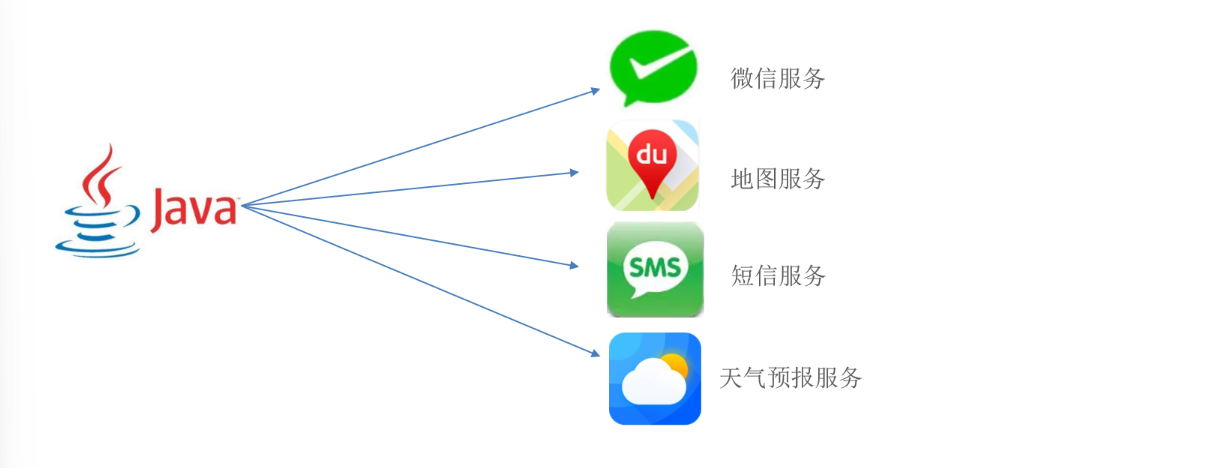
HttpClient的maven坐标:
org.apache.httpcomponents httpclient 4.5.13
HttpClient的核心API:
| 核心API | 作用 |
| HttpClient | Http客户端对象类型,使用该类型对象可发起Http请求 |
| HttpClients | 可认为是构建器,可创建HttpClient对象 |
| CloseableHttpClient | 实现类,实现了HttpClient接口 |
| HttpGet | Get方式请求类型 |
| HttpPost | Post方式请求类型 |
HttpClient发送请求步骤:
1.创建HttpClient对象
2.创建Http请求对象
3.调用HttpClient的execute方法发送请求
1.2 入门案例
能理解并简单实用即可
1.2.1 GET方式请求
实现步骤:
创建HttpClient对象
创建请求对象
发送请求,接受响应结果
解析结果
关闭资源
package com.sky.test;
import org.apache.http.HttpEntity;
import org.apache.http.client.methods.CloseableHttpResponse;
import org.apache.http.client.methods.HttpGet;
import org.apache.http.impl.client.CloseableHttpClient;
import org.apache.http.impl.client.HttpClients;
import org.apache.http.util.EntityUtils;
import org.junit.jupiter.api.Test;
import org.springframework.boot.test.context.SpringBootTest;
@SpringBootTest
public class HttpClientTest {/*** 测试通过httpclient发送GET方式的请求*/@Testpublic void testGET() throws Exception{//创建httpclient对象CloseableHttpClient httpClient = HttpClients.createDefault();//创建请求对象HttpGet httpGet = new HttpGet("http://localhost:8080/user/shop/status");//发送请求,接受响应结果CloseableHttpResponse response = httpClient.execute(httpGet);//获取服务端返回的状态码int statusCode = response.getStatusLine().getStatusCode();System.out.println("服务端返回的状态码为:" + statusCode);HttpEntity entity = response.getEntity();String body = EntityUtils.toString(entity);System.out.println("服务端返回的数据为:" + body);//关闭资源response.close();httpClient.close();}
}
1.2.2 POST方式请求
相比GET请求来说,POST请求若携带参数需要封装请求体对象,并将该对象设置在请求对象中。
实现步骤:
创建HttpClient对象
创建请求对象
发送请求,接收响应结果
解析响应结果
关闭资源
/*** 测试通过httpclient发送POST方式的请求*/@Testpublic void testPOST() throws Exception{// 创建httpclient对象CloseableHttpClient httpClient = HttpClients.createDefault();//创建请求对象HttpPost httpPost = new HttpPost("http://localhost:8080/admin/employee/login");JSONObject jsonObject = new JSONObject();jsonObject.put("username","admin");jsonObject.put("password","123456");StringEntity entity = new StringEntity(jsonObject.toString());//指定请求编码方式entity.setContentEncoding("utf-8");//数据格式entity.setContentType("application/json");httpPost.setEntity(entity);//发送请求CloseableHttpResponse response = httpClient.execute(httpPost);//解析返回结果int statusCode = response.getStatusLine().getStatusCode();System.out.println("响应码为:" + statusCode);HttpEntity entity1 = response.getEntity();String body = EntityUtils.toString(entity1);System.out.println("响应数据为:" + body);//关闭资源response.close();httpClient.close();}2. 微信小程序开发
2.1 介绍
官方网址:微信小程序
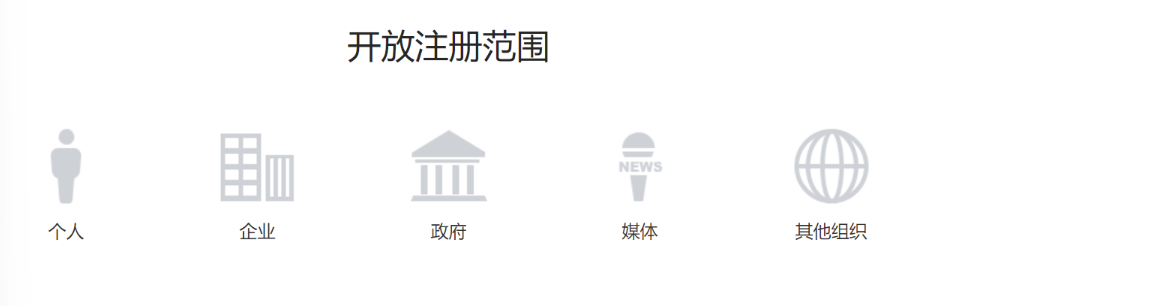
在这个项目中,我们可以以个人的身份来注册一个小程序,但是以个人身份来注册小程序,是无法开通支付权限的。(后续会解决此问题)
2.2 准备工作
开发微信小程序之前需要做如下准备工作:
注册小程序
完善小程序信息
下载开发者工具
1). 注册小程序
注册地址:小程序
本人已注册,以下是一些快捷网址与注意点,故而此处建议在B站看视频注册哦
2). 完善小程序信息
登录小程序后台:微信公众平台
3). 下载开发者工具
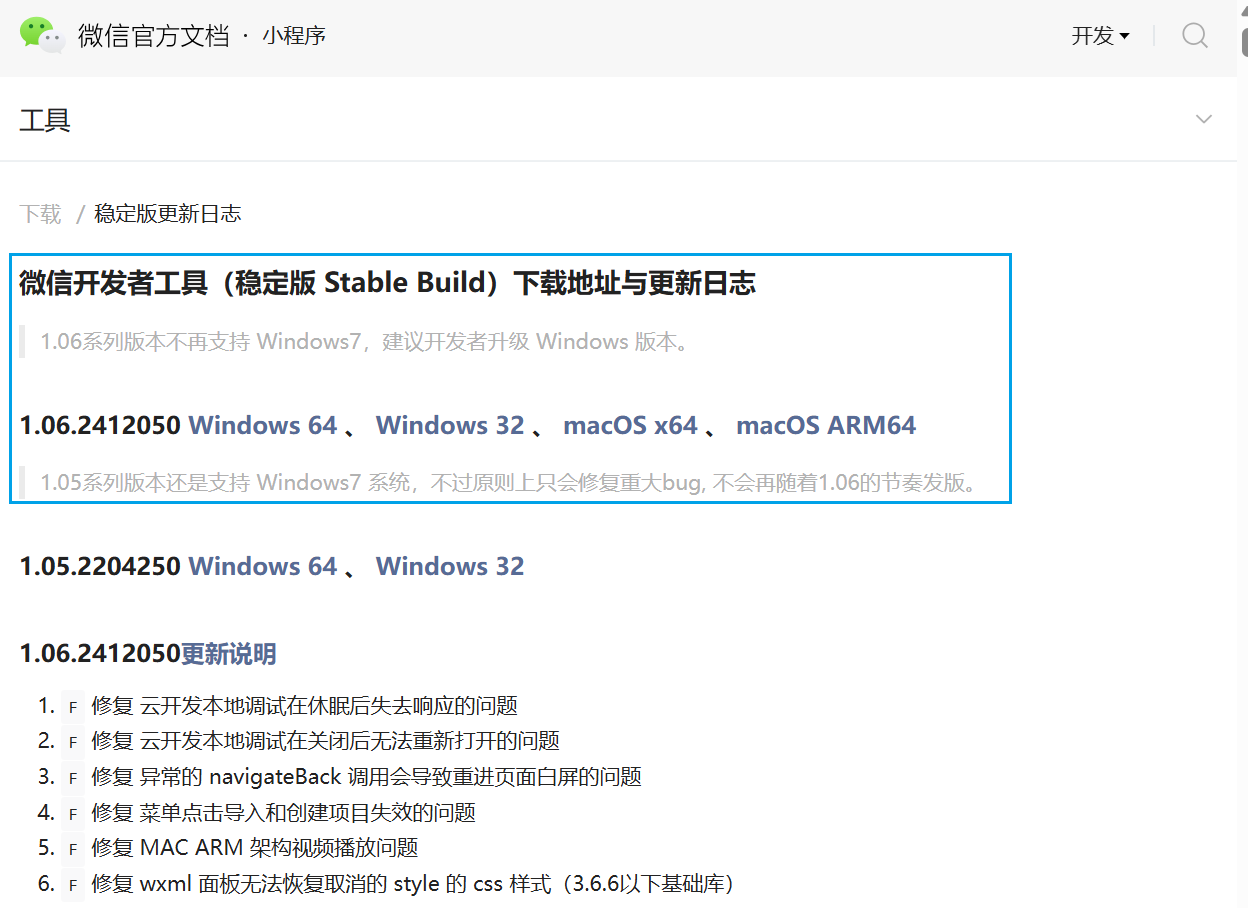
下载地址: 微信开发者工具(稳定版 Stable Build)下载地址与更新日志 | 微信开放文档
天坑一:(下载开发工具)
此处老师提供的安装包有bug,一定不要使用,应该在官网下载稳定版的开发者工具
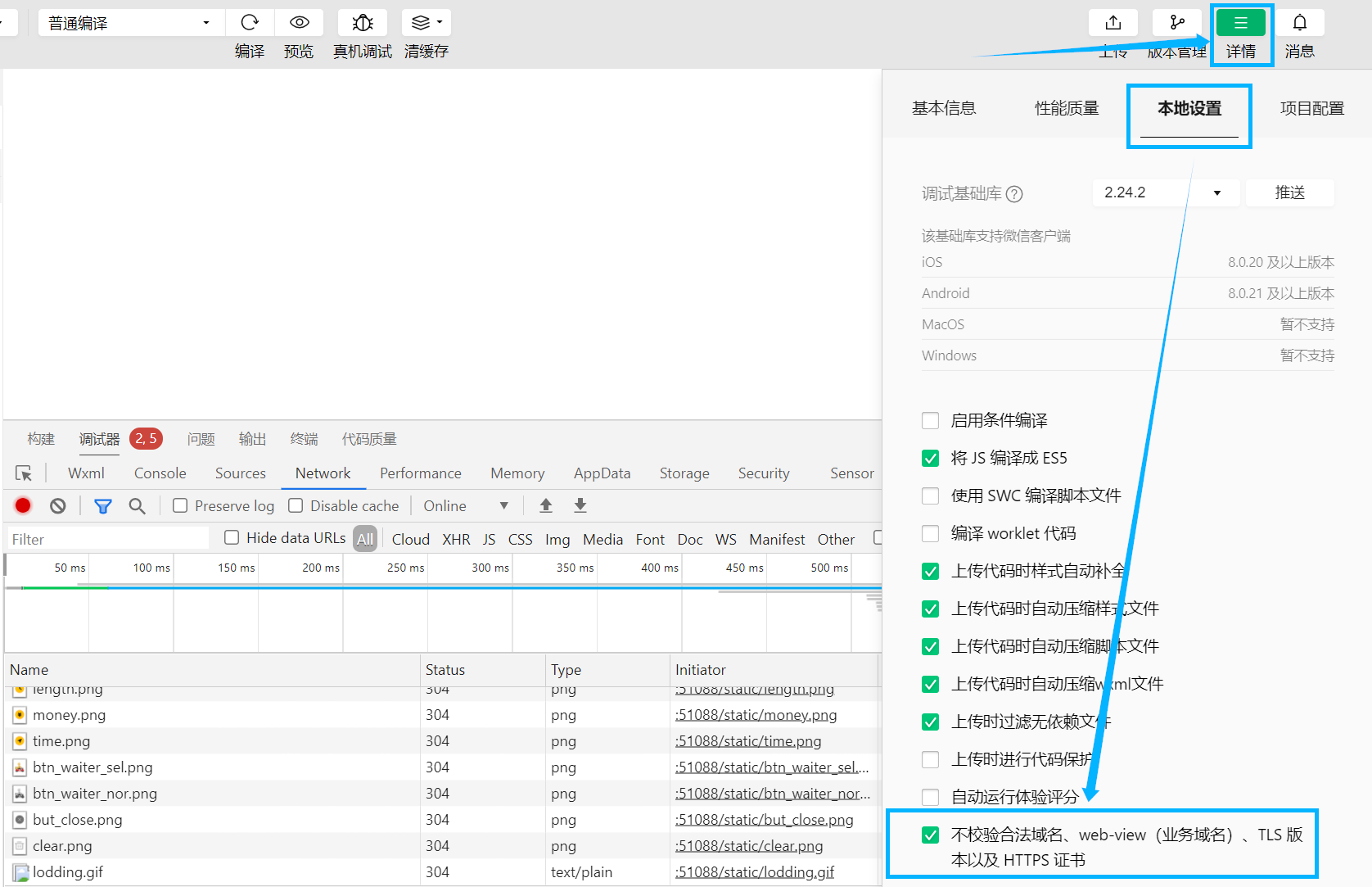
天坑二:(发送请求)
一定要勾选该勾选框!!!
注:开发阶段,小程序发出请求到后端的Tomcat服务器,若不勾选,请求发送失败。
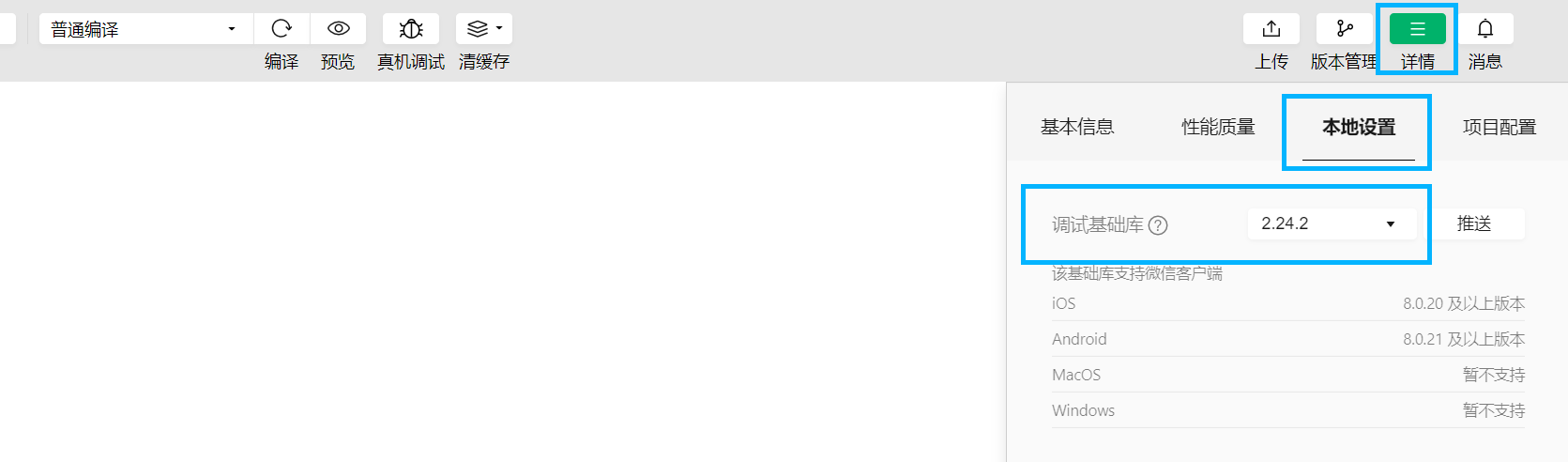
天坑三:(基础库版本选择)
调试基础库为较低的版本,本人实测,建议使用2.24.2
3. 微信登录
详细讲解
3.1 导入小程序代码
开发微信小程序,本质上是属于前端的开发,我们的重点其实还是后端代码开发。所以,小程序的代码已经提供好了,直接导入到微信开发者工具当中,直接来使用就可以了。
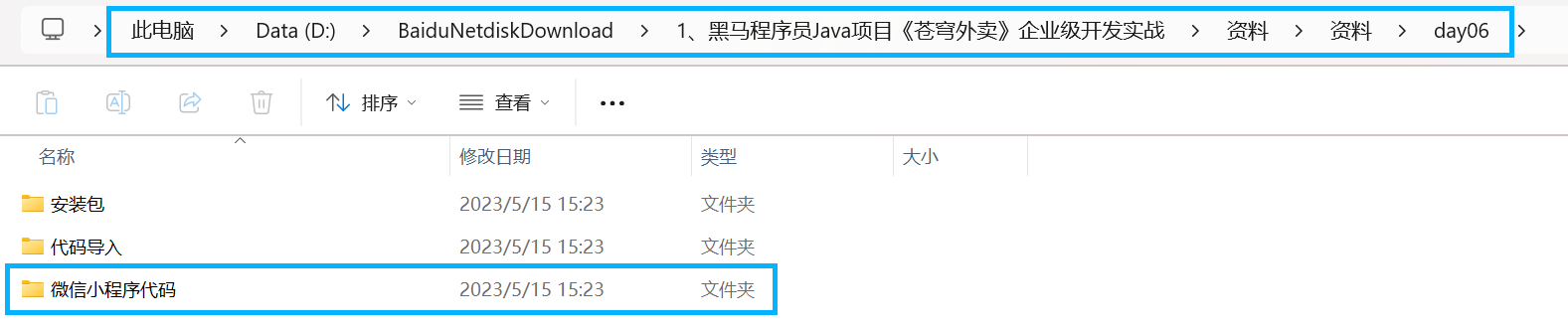
1). 找到资料
天坑四:
微信小程序代码一定要从当天资料文件夹中获取,而不是外面的小程序代码
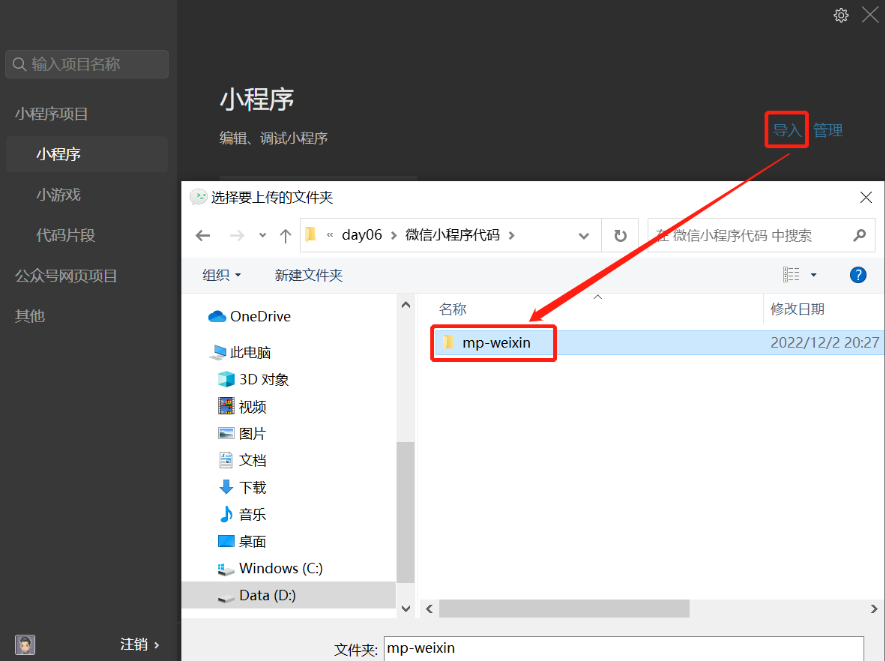
2). 导入代码
天坑五:(没有json数据)
解压后,会新增一层文件夹,注意导入时的文件夹层级是否与老师的一致
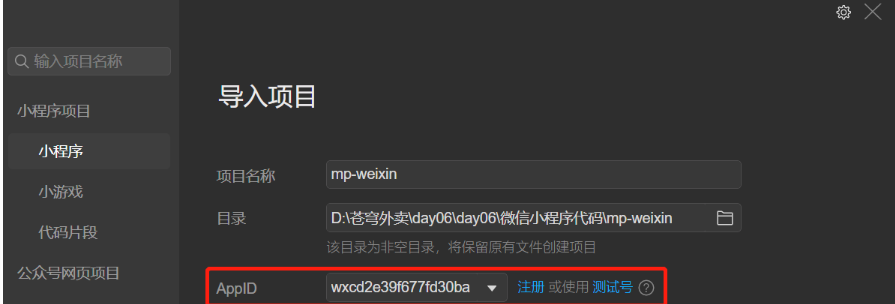
天坑六:(APPID)
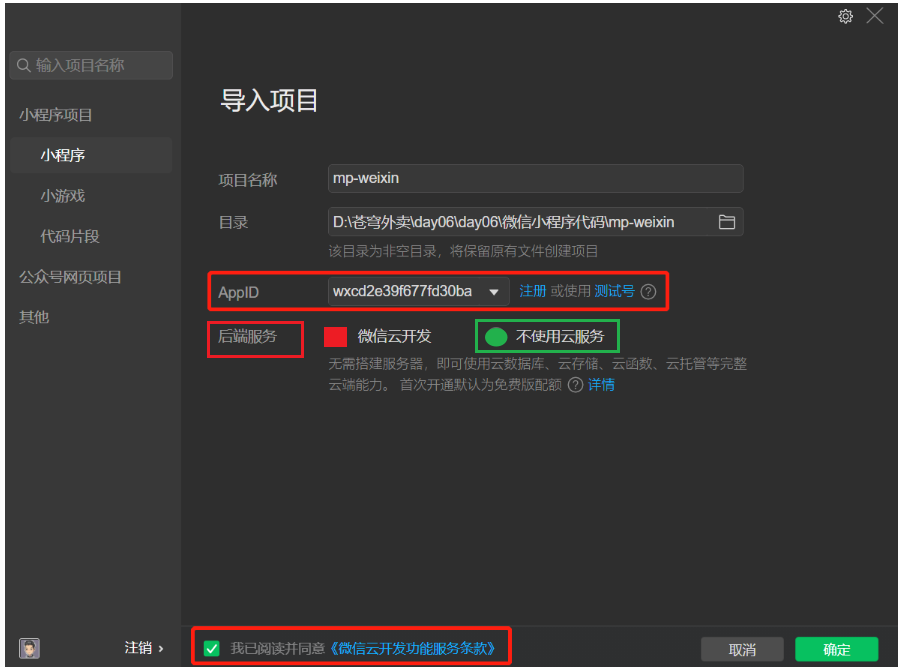
在导入时可能会自动填充APPID,请将其修改为自己的APPID
天坑七:(不使用云服务)
后端服务改为不使用云服务
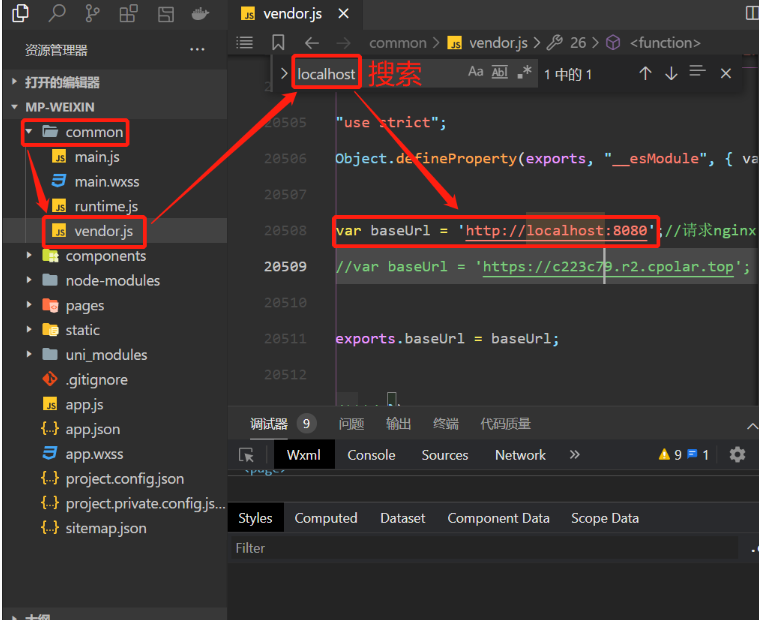
4). 修改配置
天坑八:(修改配置)
修改为自己后端服务的ip地址和端口号(默认不需要修改)
common-->vendor.js-->搜索(ctrl+f)-->localhost
3.2 微信登录流程
微信登录:小程序登录 | 微信开放文档
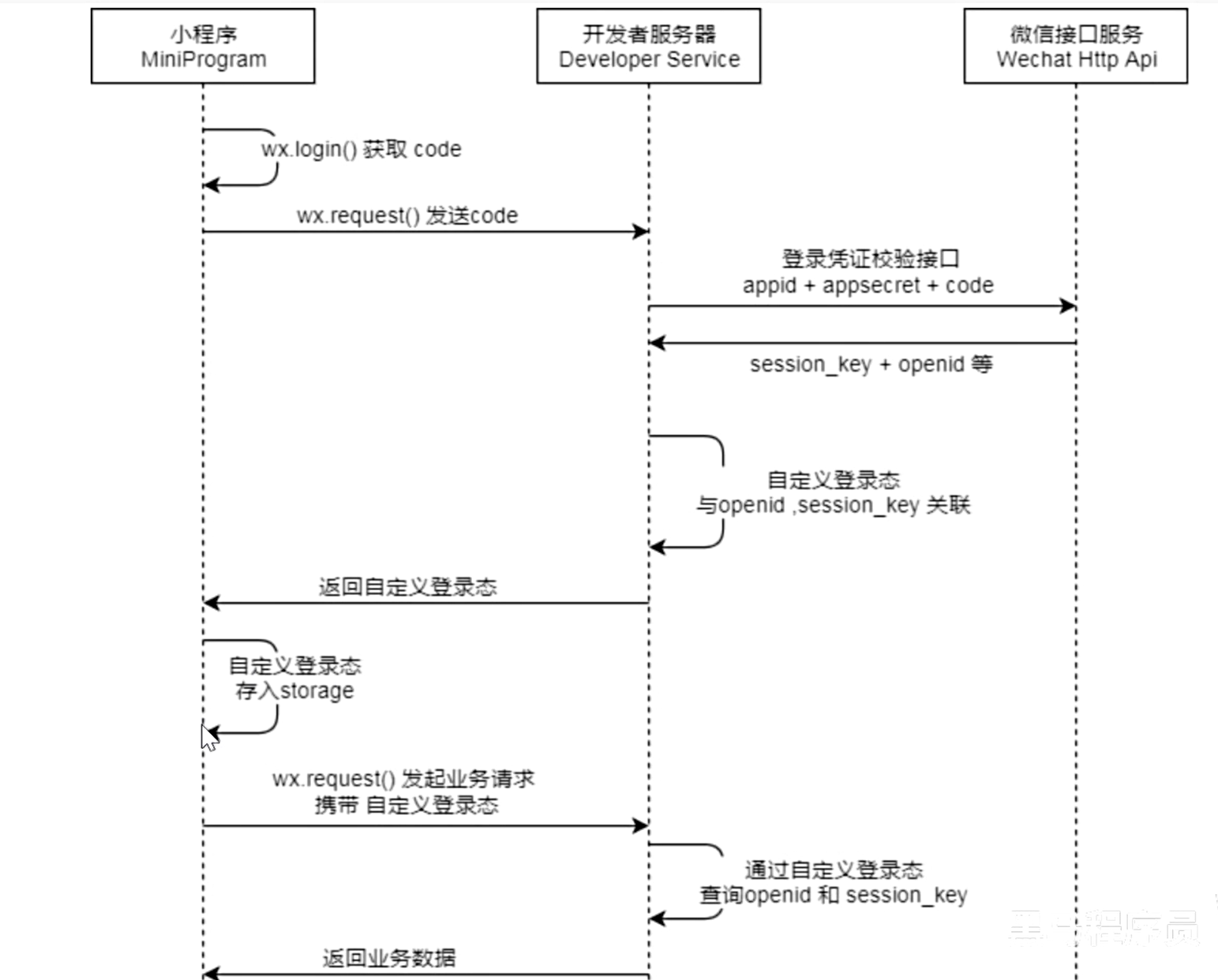
步骤分析:
小程序端,调用wx.login()获取code,就是授权码。
小程序端,调用wx.request()发送请求并携带code,请求开发者服务器。
开发者服务端,通过HttpClient向微信接口服务发送请求,并携带对应参数。
开发者服务端,接收微信接口服务返回的数据。opendId是微信用户的唯一标识。
开发者服务端,自定义登录态,生成令牌(token)和openid等数据返回给小程序端。
小程序端,收到自定义登录态,存储storage。
小程序端,后绪通过wx.request()发起业务请求时,携带token。
开发者服务端,收到请求后,通过携带的token,解析当前登录用户的id。
开发者服务端,身份校验通过后,继续相关的业务逻辑处理,最终返回业务数据。
3.3 需求分析和设计
3.3.1 产品原型
用户进入到小程序的时候,微信授权登录之后才能点餐。
需要获取当前微信用户的相关信息,这样才能够进入到小程序进行下单操作。
是基于微信登录来实现小程序的登录功能,没有采用传统账户密码登录的方式。
若第一次使用小程序来点餐,为新用户,需把这个新的用户保存到数据库当中完成自动注册。
登录功能原型图:
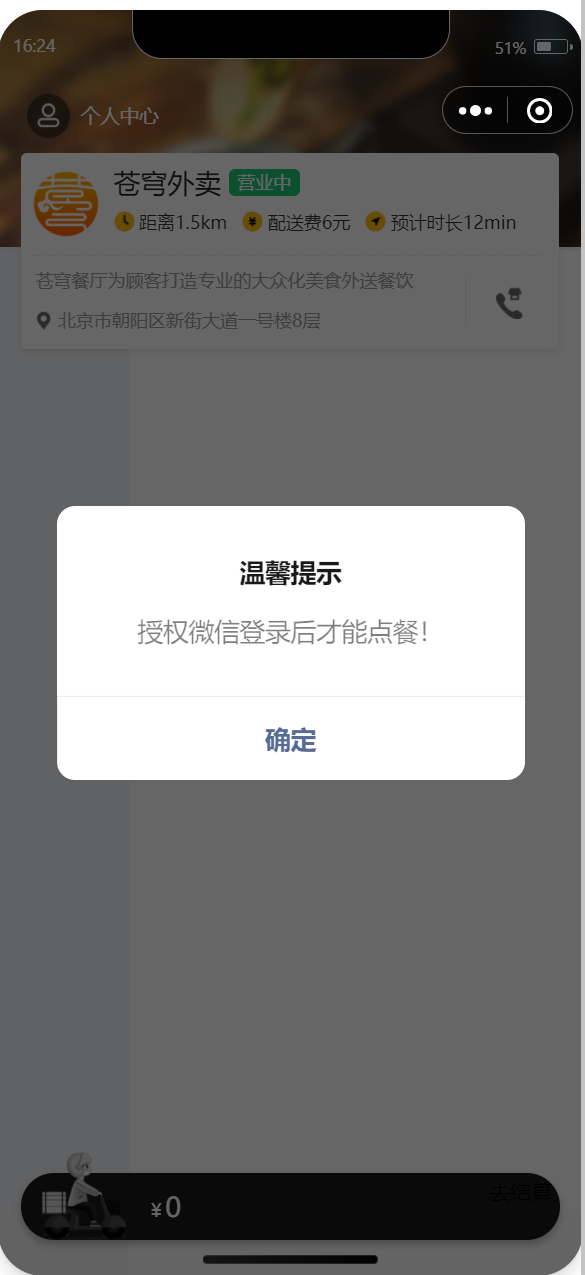
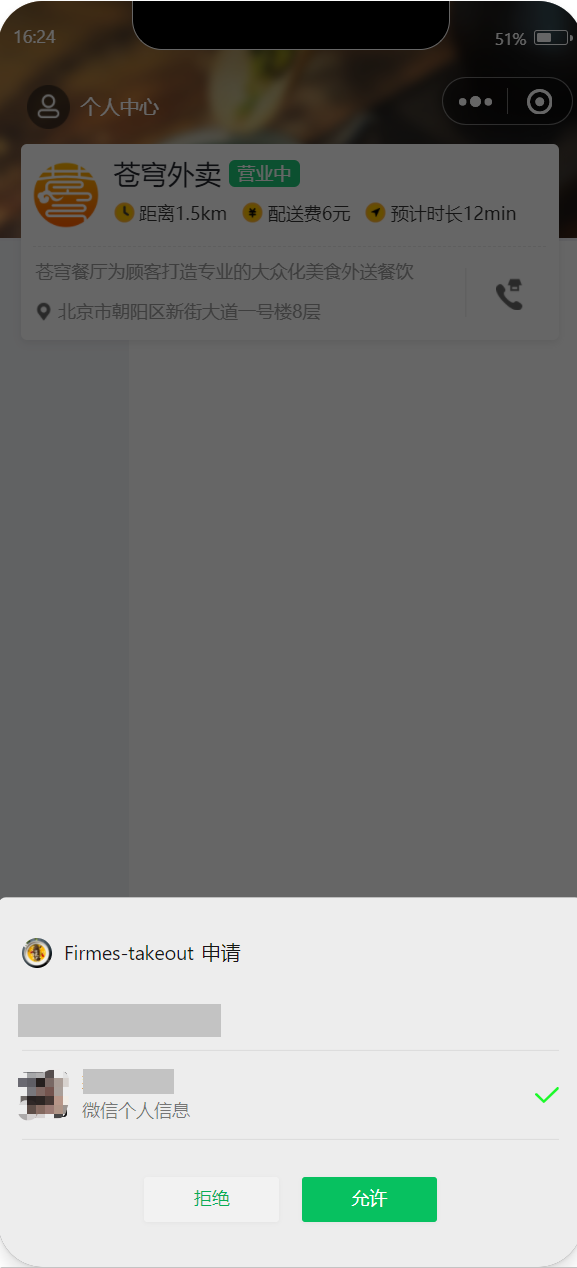
业务规则:
基于微信登录实现小程序的登录功能
如果是新用户需要自动完成注册
3.3.2 接口设计
通过微信登录的流程,如果要完成微信登录的话,最终就要获得微信用户的openid。在小程序端获取授权码后,向后端服务发送请求,并携带授权码,这样后端服务在收到授权码后,就可以去请求微信接口服务。最终,后端向小程序返回openid和token等数据。
基于上述的登录流程,就可以设计出该接口的请求参数和返回数据。
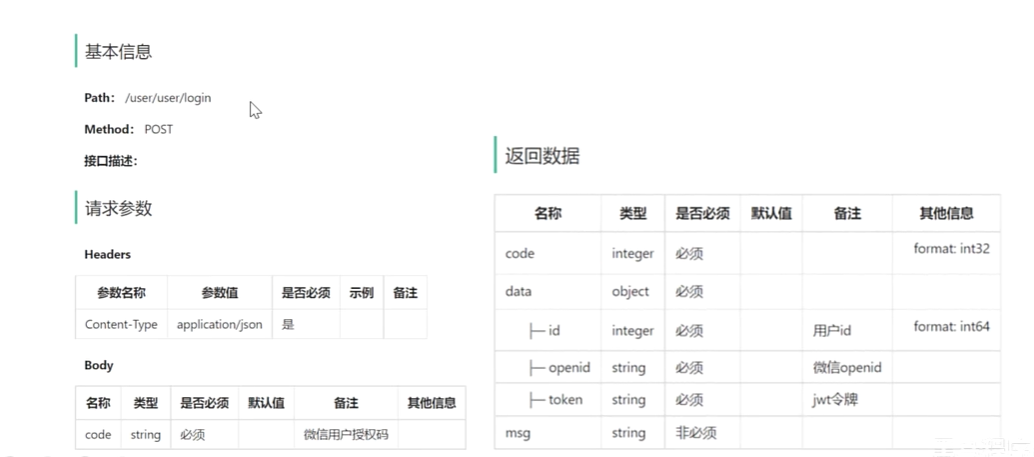
说明:请求路径/user/user/login,第一个user代表用户端,第二个user代表用户模块
3.3.3 表设计
当用户第一次使用小程序时,会完成自动注册,把用户信息存储到user表中。
| 字段名 | 数据类型 | 说明 | 备注 |
|---|---|---|---|
| id | bigint | 主键 | 自增 |
| openid | varchar(45) | 微信用户的唯一标识 | |
| name | varchar(32) | 用户姓名 | |
| phone | varchar(11) | 手机号 | |
| sex | varchar(2) | 性别 | |
| id_number | varchar(18) | 身份证号 | |
| avatar | varchar(500) | 微信用户头像路径 | |
| create_time | datetime | 注册时间 |
说明:手机号字段比较特殊,个人身份注册的小程序没有权限获取到微信用户的手机号。如果是以企业的资质 注册的小程序就能够拿到微信用户的手机号。
3.4 代码开发
3.4.1 定义相关配置
配置微信登录所需配置项:
application-dev.yml
sky:wechat:   appid: 自己的   secret: 自己的
application.yml
sky:wechat:   appid: ${sky.wechat.appid}   secret: ${sky.wechat.secret}
配置为微信用户生成jwt令牌时使用的配置项:
application.yml
sky:jwt: # 设置jwt签名加密时使用的秘钥 admin-secret-key: itcast # 设置jwt过期时间(时间本人延长了) admin-ttl: 720000000 # 设置前端传递过来的令牌名称 admin-token-name: token user-secret-key: itheima user-ttl: 720000000 user-token-name: authentication天坑九:(user-token-name)
注意是authentication,不是authorization(idea自动填充的结果)
3.4.4 Controller层
根据接口定义创建UserController的login方法:
package com.sky.controller.user;
import com.sky.constant.JwtClaimsConstant;
import com.sky.dto.UserLoginDTO;
import com.sky.entity.User;
import com.sky.properties.JwtProperties;
import com.sky.result.Result;
import com.sky.service.UserService;
import com.sky.utils.JwtUtil;
import com.sky.vo.UserLoginVO;
import io.swagger.annotations.Api;
import io.swagger.annotations.ApiOperation;
import lombok.extern.slf4j.Slf4j;
import org.springframework.beans.factory.annotation.Autowired;
import org.springframework.web.bind.annotation.PostMapping;
import org.springframework.web.bind.annotation.RequestBody;
import org.springframework.web.bind.annotation.RequestMapping;
import org.springframework.web.bind.annotation.RestController;
import java.util.HashMap;
import java.util.Map;
@RestController
@RequestMapping("/user/user")
@Api(tags = "C端用户相关接口")
@Slf4j
public class UserController {@Autowiredprivate UserService userService;@Autowiredprivate JwtProperties jwtProperties;/*** 微信登录* @param userLoginDTO* @return*/@PostMapping("/login")@ApiOperation("微信登录")public Result login(@RequestBody UserLoginDTO userLoginDTO){log.info("微信用户登录:{}",userLoginDTO.getCode());//微信登录User user = userService.wxLogin(userLoginDTO);//后绪步骤实现//为微信用户生成jwt令牌Map claims = new HashMap<>();claims.put(JwtClaimsConstant.USER_ID,user.getId());String token = JwtUtil.createJWT(jwtProperties.getUserSecretKey(), jwtProperties.getUserTtl(), claims);UserLoginVO userLoginVO = UserLoginVO.builder().id(user.getId()).openid(user.getOpenid()).token(token).build();return Result.success(userLoginVO);}
}
其中,JwtClaimsConstant.USER_ID常量已定义
3.4.5 Service层接口
创建UserService接口:
package com.sky.service;
import com.sky.dto.UserLoginDTO;
import com.sky.entity.User;
public interface UserService {/*** 微信登录* @param userLoginDTO* @return*/User wxLogin(UserLoginDTO userLoginDTO);
}
3.4.6 Service层实现类
创建UserServiceImpl实现类:实现获取微信用户的openid和微信登录功能
package com.sky.service.impl;
import com.alibaba.fastjson.JSON;
import com.alibaba.fastjson.JSONObject;
import com.sky.constant.MessageConstant;
import com.sky.dto.UserLoginDTO;
import com.sky.entity.User;
import com.sky.exception.LoginFailedException;
import com.sky.mapper.UserMapper;
import com.sky.properties.WeChatProperties;
import com.sky.service.UserService;
import com.sky.utils.HttpClientUtil;
import lombok.extern.slf4j.Slf4j;
import org.springframework.beans.factory.annotation.Autowired;
import org.springframework.stereotype.Service;
import java.time.LocalDateTime;
import java.util.HashMap;
import java.util.Map;
@Service
@Slf4j
public class UserServiceImpl implements UserService {//微信服务接口地址public static final String WX_LOGIN = "https://api.weixin.qq.com/sns/jscode2session";@Autowiredprivate WeChatProperties weChatProperties;@Autowiredprivate UserMapper userMapper;/*** 微信登录* @param userLoginDTO* @return*/public User wxLogin(UserLoginDTO userLoginDTO) {String openid = getOpenid(userLoginDTO.getCode());//判断openid是否为空,如果为空表示登录失败,抛出业务异常if(openid == null){throw new LoginFailedException(MessageConstant.LOGIN_FAILED);}//判断当前用户是否为新用户User user = userMapper.getByOpenid(openid);//如果是新用户,自动完成注册if(user == null){user = User.builder().openid(openid).createTime(LocalDateTime.now()).build();userMapper.insert(user);//后绪步骤实现}//返回这个用户对象return user;}/*** 调用微信接口服务,获取微信用户的openid* @param code* @return*/private String getOpenid(String code){//调用微信接口服务,获得当前微信用户的openidMap map = new HashMap<>();map.put("appid",weChatProperties.getAppid());map.put("secret",weChatProperties.getSecret());map.put("js_code",code);map.put("grant_type","authorization_code");String json = HttpClientUtil.doGet(WX_LOGIN, map);JSONObject jsonObject = JSON.parseObject(json);String openid = jsonObject.getString("openid");return openid;}
}
3.4.7 Mapper层
创建UserMapper接口:
package com.sky.mapper;
import com.sky.entity.User;
import org.apache.ibatis.annotations.Mapper;
import org.apache.ibatis.annotations.Select;
@Mapper
public interface UserMapper {/*** 根据openid查询用户* @param openid* @return*/@Select("select * from user where openid = #{openid}")User getByOpenid(String openid);/*** 插入数据* @param user*/void insert(User user);
}
创建UserMapper.xml映射文件:
insert into user (openid, name, phone, sex, id_number, avatar, create_time)values (#{openid}, #{name}, #{phone}, #{sex}, #{idNumber}, #{avatar}, #{createTime})
3.4.8 编写拦截器
编写拦截器JwtTokenUserInterceptor:统一拦截用户端发送的请求并进行jwt校验
package com.sky.interceptor;
import com.sky.constant.JwtClaimsConstant;
import com.sky.context.BaseContext;
import com.sky.properties.JwtProperties;
import com.sky.utils.JwtUtil;
import io.jsonwebtoken.Claims;
import lombok.extern.slf4j.Slf4j;
import org.springframework.beans.factory.annotation.Autowired;
import org.springframework.stereotype.Component;
import org.springframework.web.method.HandlerMethod;
import org.springframework.web.servlet.HandlerInterceptor;
import javax.servlet.http.HttpServletRequest;
import javax.servlet.http.HttpServletResponse;
/*** jwt令牌校验的拦截器*/
@Component
@Slf4j
public class JwtTokenUserInterceptor implements HandlerInterceptor {@Autowiredprivate JwtProperties jwtProperties;/*** 校验jwt** @param request* @param response* @param handler* @return* @throws Exception*/public boolean preHandle(HttpServletRequest request, HttpServletResponse response, Object handler) throws Exception {//判断当前拦截到的是Controller的方法还是其他资源if (!(handler instanceof HandlerMethod)) {//当前拦截到的不是动态方法,直接放行return true;}//1、从请求头中获取令牌String token = request.getHeader(jwtProperties.getUserTokenName());//2、校验令牌try {log.info("jwt校验:{}", token);Claims claims = JwtUtil.parseJWT(jwtProperties.getUserSecretKey(), token);Long userId = Long.valueOf(claims.get(JwtClaimsConstant.USER_ID).toString());log.info("当前用户的id:", userId);BaseContext.setCurrentId(userId);//3、通过,放行return true;} catch (Exception ex) {//4、不通过,响应401状态码response.setStatus(401);return false;}}
}
在WebMvcConfiguration配置类中注册拦截器:
@Autowiredprivate JwtTokenUserInterceptor jwtTokenUserInterceptor;/*** 注册自定义拦截器* @param registry*/protected void addInterceptors(InterceptorRegistry registry) {log.info("开始注册自定义拦截器...");//.........registry.addInterceptor(jwtTokenUserInterceptor).addPathPatterns("/user/**").excludePathPatterns("/user/user/login").excludePathPatterns("/user/shop/status");}注意:此处时"/user/shop/status",而不是"user/shop/status"
至此,用户相关的后端接口开发完毕,大家可以按需完善上述代码。
大功告成!